Case study · Master's graduation project · Metis Digital
SecureChat
A chat-based DevSecOps assistant for automated security scanning
Pick a repository, ask for a security scan in plain language, and get the findings back in the same conversation. Behind the chat: bounded AI tools, a durable job pipeline, and scanners running on remote MCP servers.
- Context
- Master's graduation internship, Metis Digital
- Timeline
- Feb — Jun 2026
- Role
- Sole engineer: design, build, audit
- Deliverable
- Working prototype + 100-page thesis
- AI tools, each bounded by a schema
- 8
- AI tools, each bounded by a schema
- API routes behind auth, roles, and rate limits
- 24
- API routes behind auth, roles, and rate limits
- LLM providers: OpenAI, Anthropic, Groq
- 3
- LLM providers: OpenAI, Anthropic, Groq
- OWASP risks reviewed across Web, API, and LLM
- 30
- OWASP risks reviewed across Web, API, and LLM
Why it exists
Security checks are hard for developers who aren't security specialists. You have to choose a scanner, prepare the target, manage credentials, run commands, read raw output, and keep a record of what happened. In small teams that work gets postponed until something breaks.
Metis had no internal tool for this. General assistants like Claude or Codex show how good a chat workflow can feel, but they don't offer repository scoping, scan orchestration, job tracking, or security controls. Traditional scanners do the work, but they need manual commands and leave you to interpret the output. SecureChat was built from scratch to close that gap.
What it does
Ask for scans in plain language
"Run a Gitleaks scan on this repo." The agent turns the request into a planned security run. Incompatible scanners are skipped with an explicit reason instead of failing silently.
Follow progress live
Job status and scanner health stream to the UI over Server-Sent Events (originally polling, refactored to SSE). Users can tell an unavailable scanner apart from a slow one, and retry failed jobs.
Read findings in context
Results are stored per run and job, so later questions like "what did the last scan find?" are answered from persisted output rather than the model's memory.
Review merge requests
With GitLab connected, the agent lists open merge requests awaiting your review and loads their changes as bounded diff context for a security-minded review.
Plug in new scanners without code changes
Admins register MCP servers, test connectivity, discover their tools, and map them to scanner routes from an admin console. The chat workflow never changes.
A scanner of my own
A demo MCP server that clones the target repository in Docker, reads its dependency manifests, queries OSV.dev for known vulnerabilities, and posts results back through the webhook contract.
How a request flows
- 01
Chat
The request arrives with the session, chat, and selected repository. No repository means no scan.
- 02
Plan
The planner keeps only healthy scanner routes that are compatible with the target.
- 03
Persist & queue
A scan run and its jobs are written to SQLite, then enqueued in BullMQ.
- 04
Invoke
The worker calls the remote MCP tool with a per-job callback URL and token; the tool must answer accepted.
- 05
Callback
The scanner posts results to the webhook, which validates the token, stores raw output, and updates the run.
- 06
Answer
Status streams to the UI, and findings are read back into the conversation on later turns.
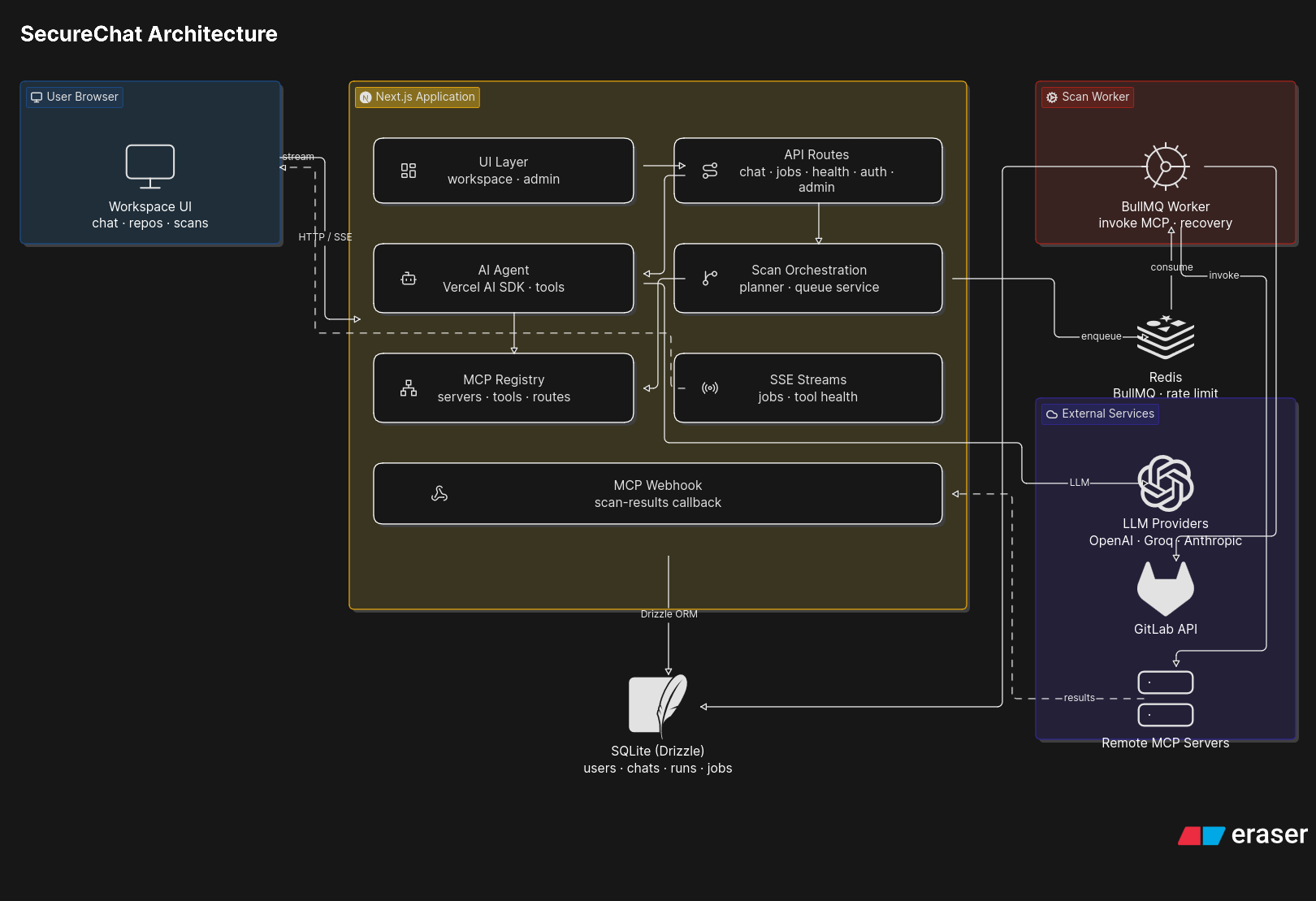
Key engineering decisions
The model orchestrates; it never executes
The agent can only call predefined application tools. Starting a scan means creating database records and queue jobs — not giving a language model a shell.
SQLite is the source of truth, Redis only delivers
Run and job status live in the database. A restarted worker or a flushed queue never loses track of what happened, and the worker restores queued jobs from SQLite on startup.
A strict webhook contract for scanners
Scanner tools must return { accepted, remoteExecutionId } immediately and deliver results later. A synchronous result is treated as a failure, so every scan follows the same observable path: queued → running → awaiting_callback → done or failed.
Persist the route with the job
The chosen MCP server and tool are saved on each job, so delayed jobs and retries hit the same scanner that was planned instead of silently picking another one.
Plan for things going wrong
Stale running jobs are recovered after restarts, callbacks expire, retries back off, duplicate callbacks are ignored, and queue and scanner health have their own endpoints.
Security, by design
SecureChat handles provider tokens and source code, so it needs a security layer of its own. I mapped the design against the OWASP Web Top 10, the API Security Top 10, and the Top 10 for LLM Applications.
- AES-256-GCM encryption for OAuth tokens, scan secrets, and MCP credentials
- Per-job callback tokens stored hashed, compared in constant time, with expiry
- Local and GitLab OAuth sign-in, role-separated admin console
- Repository-scoped chats; Zod schemas on every AI tool input
- Rate limiting, trusted-origin checks, and request-size guards
- Excessive-agency control: tools only, no free-form command execution
Then I audited it
Building controls isn't the same as testing them. Using code inspection, route checks, configuration review, and dependency auditing — guided by OWASP ASVS and a lightweight EBIOS Risk Manager reading — I reproduced 8 findings on the local setup and documented each with a fix:
- 01Redis exposed without authenticationQueue data readable from the open dev port
- 02No Content Security PolicyChat renders model output and links
- 03Local registration left enabledShould be invite-only in production
- 04SSRF-style repository URLsInternal addresses accepted as scan targets
- 05Chunked body-size bypassLimits trusted Content-Length only
- 06Rate limiting failed openRequests passed while Redis was down
- 07Vulnerable dependencies77 advisories → 0 in production deps after remediation
- 08Server technology disclosureX-Powered-By header, confirmed with OWASP ZAP
Being honest about what's broken is the point of an audit. These findings set the hardening backlog before any production rollout.
Outcome
A working repository-scoped workflow: ask in natural language, and the platform checks the target, picks a compatible scanner, creates the job, stores the output, and links the result to the right chat and repository.
Validated locally across eight scenarios — authentication and roles, repository scoping, tool orchestration, run planning, queue and worker, persistence, MCP routing, and live feedback.
Next · Scheduled scans, clearer reports, remediation guidance, and the audit fixes.